
Prepare and share an assembly exercise
Configure register testcases, distribute a shared MIPS project, and embed the exercise in a lesson page.
Prepare a MIPS addition exercise with two testcases, share it with students, and optionally embed it in a lesson page. Students add one instruction and check its result in a register. They need a browser and an introduction to register operands.
Prepare the exercise
The task is to add $t0 and $t1, leaving their sum in $t2. Use the small signed values below to avoid introducing overflow.
Give students this starter:
.text
.globl main
main:
# Put $t0 + $t1 in $t2 here.
li $v0, 10
syscallThe testcase sets the input registers and checks $t2 after execution. li $v0, 10 and syscall end the program. The answer stays in $t2; nothing is printed.
Create a MIPS project and copy the starter into its assembly file. Open Testcases, choose + New testcase, and name it Two positive numbers. In Registers, set Start values $t0 = 17 and $t1 = 25, and Expected $t2 = 42.
Add a second case with Start $t0 = -3 and $t1 = 8, and Expected $t2 = 5. This catches a solution that only loads 42.
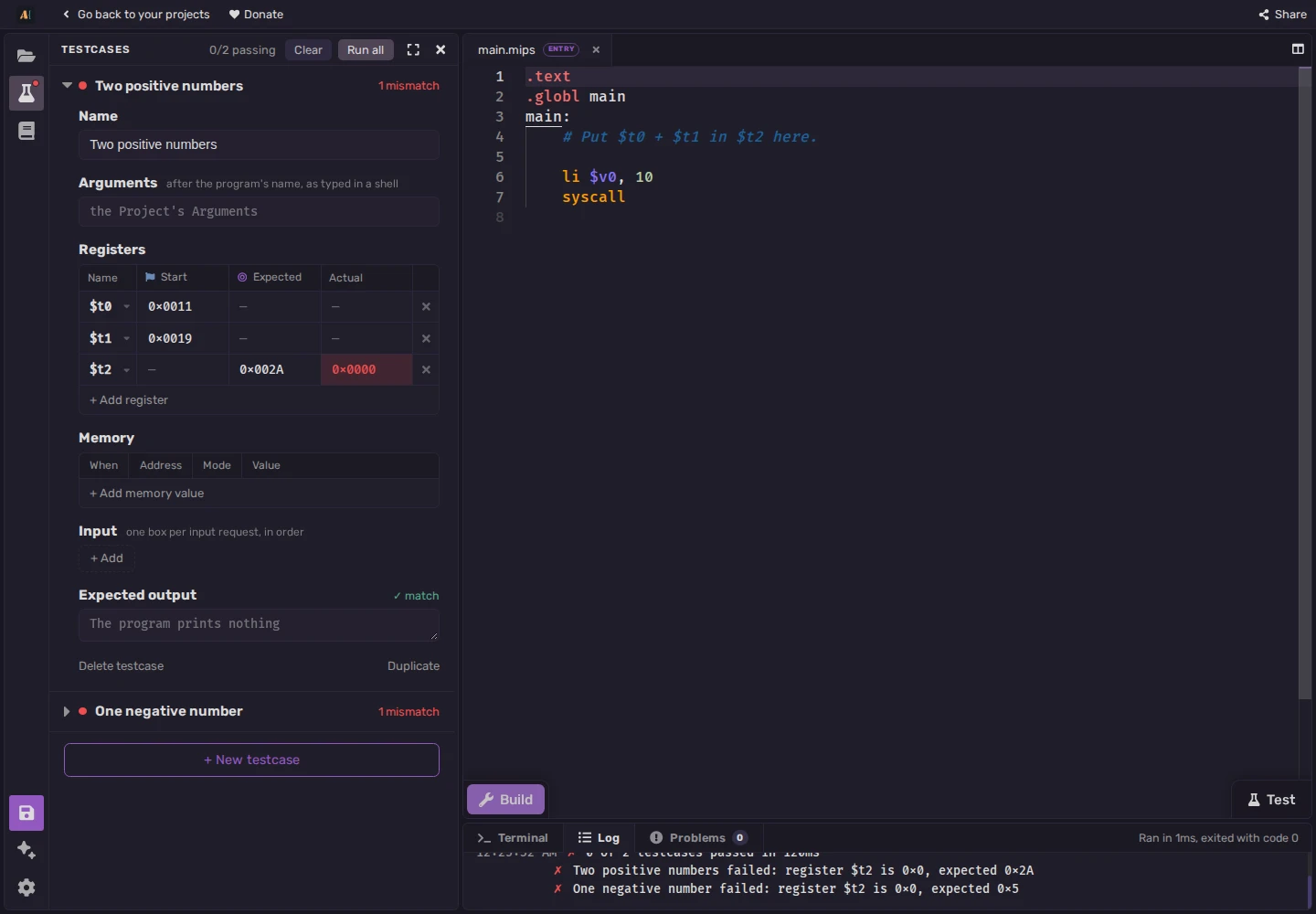
The screenshot uses hexadecimal: 0x0011, 0x0019, and 0x002A mean decimal 17, 25, and 42. Actual 0x0000 is zero: the starter has not calculated the sum.
Enter the solution below and choose Test. Choose Stop if needed, restore the incomplete starter, then use Share to copy a link. It contains a snapshot of the files, architecture, configuration, and both testcases. Students edit their own copy. Create a new link for later revisions.
Open the link to check the starter and both cases before distributing it. Students set their own breakpoint for the optional trace below.
Instructor solution
.text
.globl main
main:
add $t2, $t0, $t1
li $v0, 10
syscallStudent instructions
Include these steps with the link:
- Open the project link and read the two Testcases. Explain why their expected answers are 42 and 5.
- Add an instruction where the comment asks for the calculation. Build to check that the assembler accepts it.
- Choose Test. Open a failed case in Testcases. Its Registers table shows Actual beside Expected; compare
$t2's values before changing your code. - Explain which register your instruction reads first, which other register it reads, and which register receives the result.
For a manual trace, create a second MIPS project named Addition trace and copy the instructor solution. Add li $t0, 17 and li $t1, 25 before add. Click the narrow margin to the left of the line numbers beside add to set a breakpoint, then Build and Run.
At the pause, inspect $t0 and $t1 in the Registers panel, predict $t2's value after the addition, then Step and check $t2. Testcase starting values apply to Test; ordinary Run needs the initialization instructions.
For a destination-register question, try add $t0, $t0, $t1. It calculates the sum in $t0, leaving the required result register $t2 unchanged.
Embed the exercise
Open the embed builder, choose MIPS, and enter the starter. Enable Show registers and Show tests, then choose Testcases in the preview. Add the same two cases with + New testcase: Start 17 and 25, Expected $t2 = 42; Start -3 and 8, Expected $t2 = 5. Use the registers and columns described above. Show tests displays the controls but does not create cases.
Test the solution in the preview, then restore the starter. Copy Embed URL for a direct link, or the iframe code for a page that accepts HTML embeds. Both include the program and cases.
Enable the Open in editor button for access to a full project. Check the embed in the course page before class: the host controls iframe support and space. Use a full project when students need several files or more room for debugging.
Adapt the exercise
For subtraction, choosing the larger value, or accumulation, change the task and expected results. Include cases for reversed operands, equality, or negative numbers as appropriate. Ask for a short trace or explanation as well as passing tests; the tests check behavior, while the explanation shows the student's reasoning.
The Exam builder provides assembly coding, C coding, multiple-choice, and open-question sections, plus time-limit and password controls. Rehearse its workflow with the class before using it for an assessment.
Use the MIPS course for language lessons and the first tour for Build, Run, Step, and breakpoints.