
Run RISC-V assembly with the RARS-based simulator
Run an RV32 program, inspect its input and registers, and use breakpoints in ASM Editor's RARS-based simulator.
Run a RISC-V program that reads an integer and doubles it, then inspect the addition at a breakpoint. ASM Editor's RISC-V engine comes from RARS and runs in your browser. No previous simulator experience is required.
Start in the playground
The embedded editor selects RISC-V, the 32-bit target called RV32. Choose Build, then Run. Enter 21 in the console and press Enter.
RISC-V-64 selects RV64, with 64-bit general registers instead of 32-bit registers. Use RV32 here; the RISC-V course also begins with it.
.data
prompt: .asciz "Give me a number: "
answer: .asciz "\nTwice that is "
.text
.globl main
main:
li a7, 4
la a0, prompt
ecall
li a7, 5
ecall
mv t0, a0
add t1, t0, t0
li a7, 4
la a0, answer
ecall
li a7, 1
mv a0, t1
ecall
li a7, 10
ecallThe output is Twice that is 42. Choose Open in editor for the remaining steps. It creates a project with this program loaded; Terminal below the code handles input and output. Alternatively, create a project, select RISC-V, and copy the program into its assembly file.
Environment calls
add t1, t0, t0 adds t0 to itself and stores the result in t1. A register is a small storage location in the simulated processor.
Input and output use ecall, an environment call. RISC-V defines the instruction; the simulator defines its services. a7 selects the service:
| Service | Action | Value used or returned |
|---|---|---|
| 4 | Print a string | Its memory address in a0 |
| 5 | Read a decimal integer | Result in a0 |
| 1 | Print a signed integer | Number in a0 |
| 10 | End the run | No input needed |
.data stores the messages. .asciz appends a zero byte to mark the string's end. la a0, prompt loads its address, the location where the message begins.
li loads a number into a register. .text, .globl main, and main: set up the instructions and starting label. Keep them unchanged for this exercise.
mv t0, a0 saves the input before a later print request replaces a0 with a message address.
Linux RISC-V programs also use ecall, with different service conventions. The services here belong to the RARS-style learning environment.
Inspect the addition
If Stop is shown, choose it. Click the narrow margin to the left of the line numbers beside add t1, t0, t0. The breakpoint marker tells Run to pause before that instruction.
Build and Run, then enter 21. Find t0 in Registers, to the right on a wide screen or under Registers & memory below Terminal on a narrow screen. It holds 21. Choose Step: t1 receives 42, or hexadecimal 2A. Hover over the value to inspect its numeric representations.
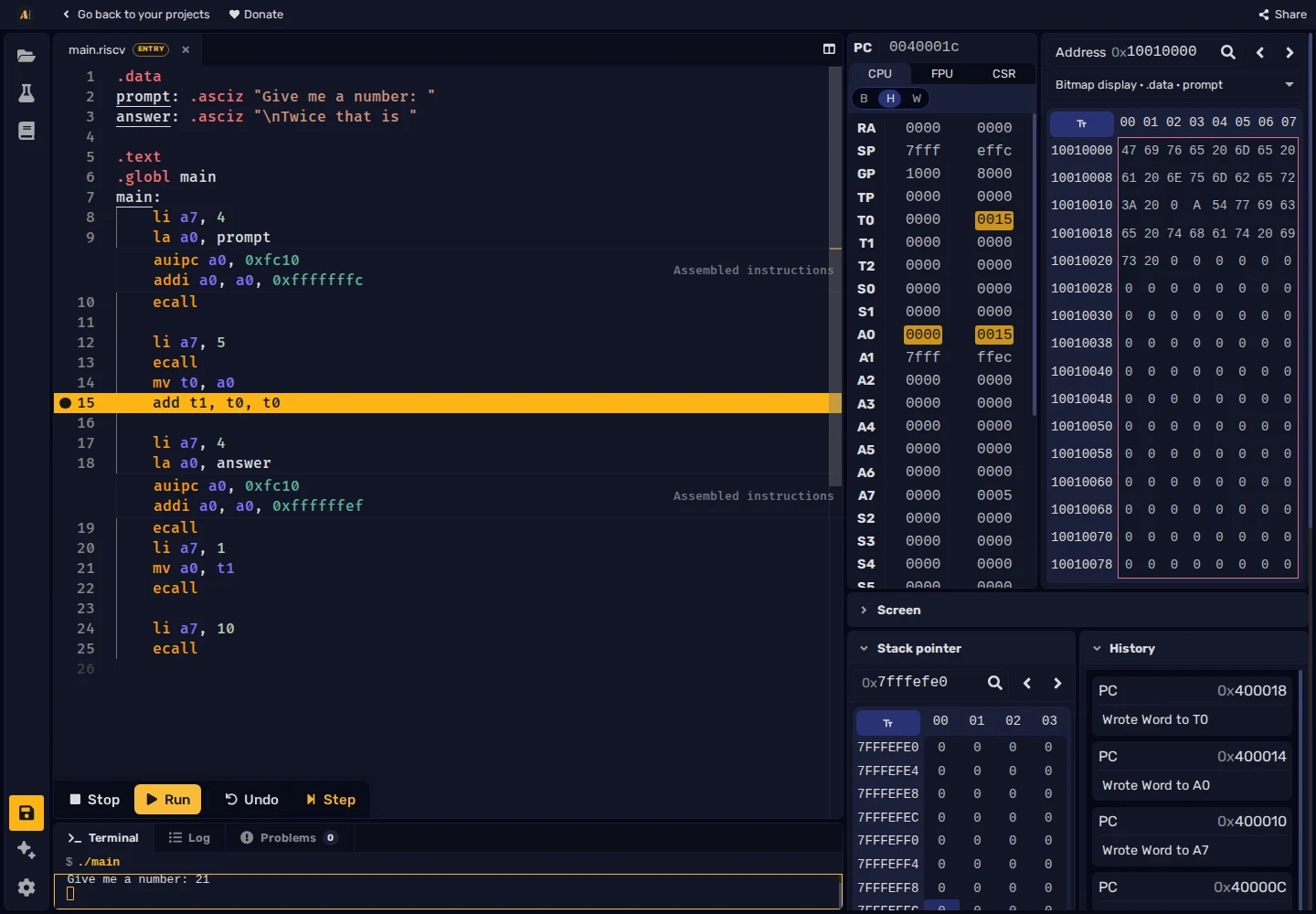
The pictured 0015 in t0 is hexadecimal for the input, decimal 21.
Choose Undo to restore t1's value before the addition. Step repeats the instruction; Run continues to the printed answer.
Choose Stop, replace the addition with sub t1, zero, t0, then Build and Run. The zero register always holds 0, so this instruction stores 0 minus the input in t1. Enter 21 and Step at the breakpoint: t1 becomes -21. Run prints Twice that is -21: the message is unchanged and no longer describes the calculation.
RV64 differences
This example's values fit RV32. Larger arithmetic and pointers may need RV64. Check both instructions and services when switching modes: wider registers do not automatically make an integer-print service accept arbitrary 64-bit values.
Programs for another simulator, processor, or operating system may require optional instruction extensions or environment behavior this editor does not provide. A RARS-based engine does not guarantee compatibility with every RISC-V program.
For a class, choose Share in the full editor. The link contains a snapshot of the files, architecture, configuration, and testcases. Students edit their own copy and set their own breakpoint. Later instructor edits require a new link.
See the RISC-V course for the language, the ecall reference for services, and the first tour for project controls.