
Run MIPS assembly with the MARS-based simulator
Read input, inspect registers, and step through a MIPS calculation in ASM Editor's MARS-based simulator.
Run a MIPS program that reads an integer, doubles it, and prints the result. Then inspect the calculation at a breakpoint. ASM Editor's MIPS engine comes from MARS and runs in your browser; no previous simulator experience is required.
Run the program
In the embedded editor below, choose Build, then Run. Enter 21 at the prompt and press Enter.
.data
prompt: .asciiz "Give me a number: "
answer: .asciiz "\nTwice that is "
.text
.globl main
main:
li $v0, 4
la $a0, prompt
syscall
li $v0, 5
syscall
move $t0, $v0
add $t1, $t0, $t0
li $v0, 4
la $a0, answer
syscall
li $v0, 1
move $a0, $t1
syscall
li $v0, 10
syscallThe output is Twice that is 42. With input -3, the result is -6.
Choose Open in editor for the remaining steps. Alternatively, create a project, select MIPS, and copy the program into its assembly file. Input and output appear in Terminal beneath the code.
Read the instructions
.data holds the two messages. A label such as prompt: names a memory location. .asciiz stores the characters followed by a zero byte, marking the string's end. \n is a newline.
.text holds instructions, and main: names the program's start. A register is a small storage location in the processor. li loads a number; la loads a labelled address, the location where data is stored. Loading prompt's address does not load its characters.
syscall requests the service selected in $v0. Service 4 prints the string at $a0; service 5 reads a decimal integer into $v0; service 1 prints the integer in $a0; service 10 ends the run. These conventions belong to the simulator and need not match a MIPS operating system.
After the read, this instruction saves the input:
move $t0, $v0The read replaced $v0's service number with the input. Saving it in $t0 allows later services to reuse $v0. The addition puts the doubled value in $t1.
Pause before the addition
If Stop is shown, choose it, even if the program has finished. Click the narrow margin to the left of the line numbers beside add $t1, $t0, $t0. The marker is a breakpoint. Build and Run, then enter 21 in Terminal.
Run pauses before the addition. Find Registers to the right on a wide screen, or scroll below Terminal to Registers & memory on a narrow screen. $t0 holds 21. Choose Step once: $t1 receives 42.
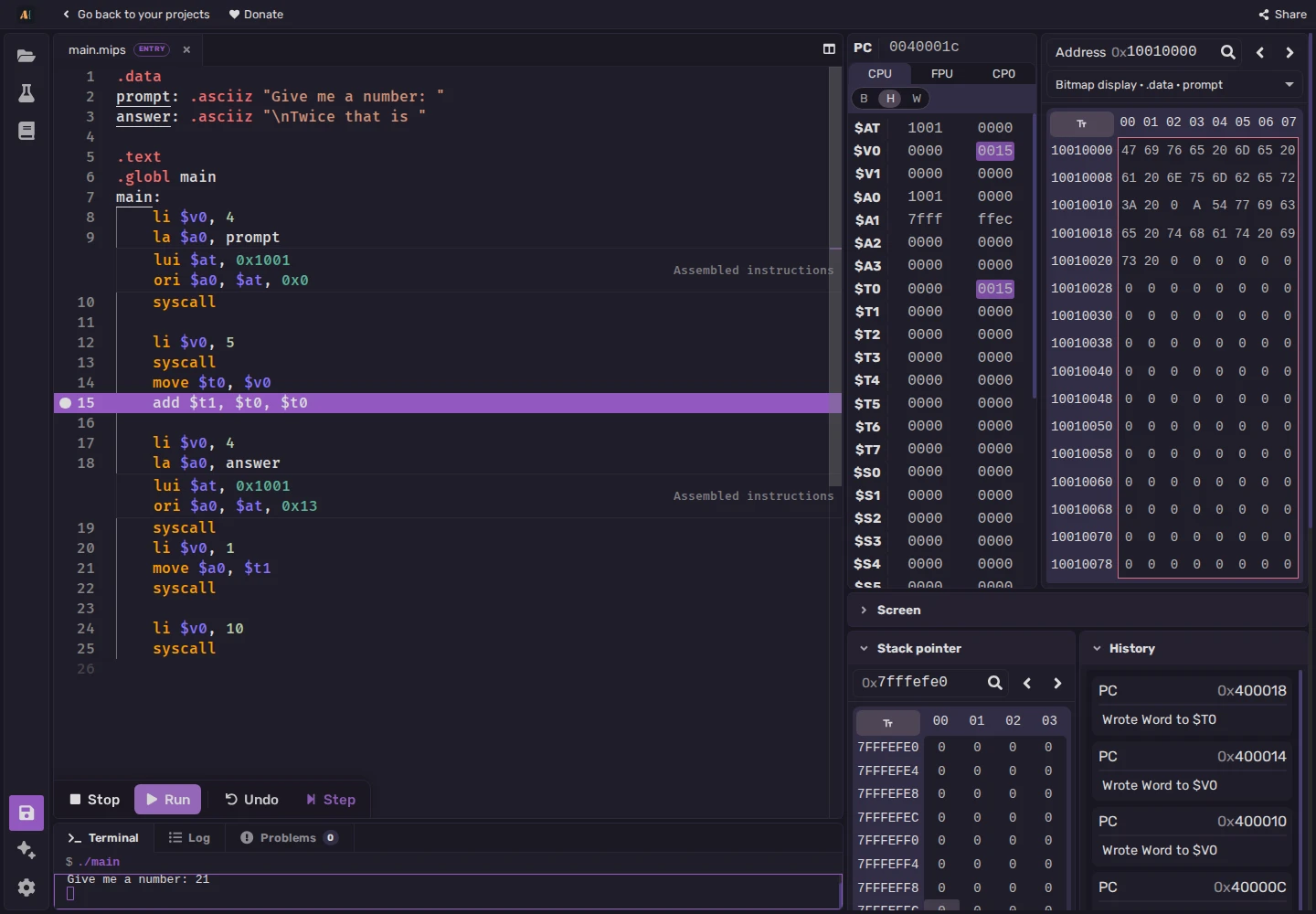
Hexadecimal 15 means decimal 21, and 2A means 42. Hover over a value to compare representations. Choose Undo to restore $t1's previous value, then Step to repeat the addition. Choose Run to continue and print the answer.
Choose Stop, replace the addition with add $t1, $t0, $zero, then Build and Run. Enter 21, Step at the breakpoint, and check $t1: adding zero leaves 21. Run prints Twice that is 21. The message is unchanged and no longer describes the calculation.
Using it alongside a MARS course
ASM Editor has its own interface, project format, and supported devices. MARS desktop tools, plugins, settings, and workflows do not all have browser equivalents. Check any assignment requirement that depends on a desktop feature before substituting tools.
To distribute this program, choose Share in the full editor. The link contains a snapshot of the files, architecture, configuration, and testcases. Students edit their own copy and set their own breakpoint. Later instructor edits require a new link.
See the MIPS course for registers, memory, branches, and functions; the syscall reference for services; and the first tour for project controls.