
Reverse engineering an x86-64 executable
Import a Linux executable and follow an input byte through a comparison, flag, and conditional jump.
Import the supplied x86-64 executable, inspect its assembly, and trace a conditional jump. You need a browser and the practice file below; its original source is optional. The program reads a letter, checks for uppercase A, and prints Accepted or Try again.
Import the practice program
Download first-branch. Open Projects, choose Import, and select the file. Its ELF contents identify it as an executable and create an x86 project with it as the entry file. ELF is a file format used for Linux programs; x86-64 identifies the processor instructions it contains.
Open the project and wait for its Listing in the main code pane. Disassembly decodes machine instructions into assembly; decompilation attempts to express them as higher-level code such as C. The Listing is read-only disassembly. Build loads the executable's bytes, not this text.
Terminal sits below the code. After Build, Registers and Memory appear to the right on a wide screen, or below Terminal in Registers & memory on a narrow screen.
A label names a code or data location. This file retains names including main and answer. The editor assigns names where an executable lacks them.
This program loads at fixed addresses and needs no separately loaded libraries. Use the executable for the walkthrough. The optional assembly source is for comparison or rebuilding with an external assembler.
Find the decision
Search the Listing for cmp, the compare instruction:
cmp byte [rel answer], 0x41
je acceptedUppercase A is byte value 65, or hexadecimal 0x41. Hexadecimal uses base 16; 0x marks that representation.
answer is a 16-byte buffer, memory reserved for input. [rel answer] reads its contents, and byte limits the comparison to one byte. rel locates the data relative to the instruction position. The instruction checks the first character, not the whole line.
cmp updates flags, pieces of processor state describing a result. je, “jump if equal,” uses those flags to choose the next instruction. Equality takes the Accepted path; otherwise execution continues toward Try again.
Break before the compare
Click the narrow margin to the left of the Listing addresses beside cmp. The marker is a breakpoint. Choose Build to load the program and advance to main, where it waits for an execution command.
Choose Run. At Terminal's Type a letter: prompt, enter A and press Enter. Execution pauses before cmp.
The highlight marks the next instruction; the comparison has not run. The instruction pointer, rip, holds its address, the number identifying a memory location.
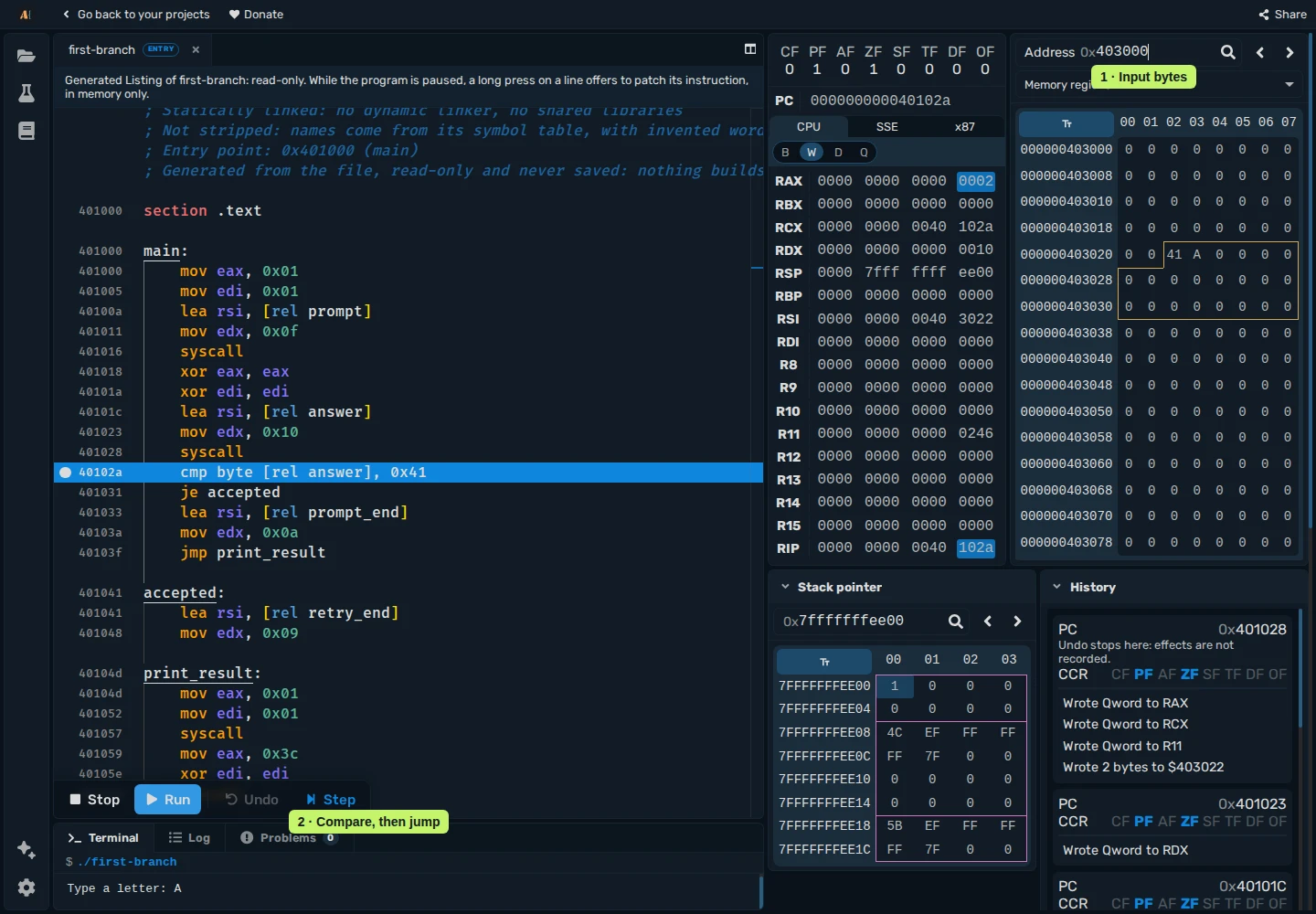
Inspect the input and ZF
Hover over answer in the Listing to see its address, 0x403022. Enter 403022 in Memory and press Enter. The displayed page starts at 403000. Locate row 403020, column 02: this is 403022, containing hexadecimal 41 for the entered A. The requested byte is not the grid's first cell.
Registers, such as rax, rdi, and rsi, are small storage locations in the processor. This comparison reads memory and updates flags, so you can follow it without memorizing those register names.
Step once to execute cmp. Check ZF, the zero flag, above PC and the register rows. Equal values set ZF to 1 because the comparison's subtraction produces zero. In the screenshot, ZF is already 1 before cmp; check its value after Step without expecting a visible change. The input byte stays unchanged.
Step through je accepted. With ZF set, the highlight moves under accepted: at 0x401041. Check that target, then Run. Terminal prints Accepted and the program exits.
Compare the other path
Choose Stop, then Build for a fresh run. Keep the same breakpoint. Run, enter B, and press Enter.
The first byte of answer is now hexadecimal 42, representing B. Step through cmp: ZF is 0. Step through je: execution continues to the next instruction without taking the jump. Run prints Try again.
Repeat with lowercase a to check a third input. Its byte value differs from uppercase A.
Find references to a message
Search the Listing for Accepted, locate its string label, then right-click the label and choose Go to References. Inspect the code that uses the message and find its connection to the branch above.
The exercise covers instruction reading, input inspection, and branch tracing used in binary analysis and cybersecurity. Larger programs can contain many functions, missing names, library calls, and unsupported instructions or system calls. See the executable reference for supported formats and environment limits.