
Compile C/C++ to assembly and debug it
Compile a C or C++ loop, trace its MIPS instructions, and inspect the result in registers and memory.
Compile a C or C++ loop to MIPS assembly, pause at an addition, and inspect its register and memory values. Compile needs an internet connection; the generated program runs in the browser.
Start with a small C program
Choose Open in editor below to open a MIPS project with this main.c loaded. Use the full Workbench for the remaining steps. Alternatively, create a MIPS project, choose New text file in Explorer, name it main.c, and copy the program:
#include <stdio.h>
int main(void) {
int total = 0;
for (int n = 1; n <= 3; ++n) {
total += n;
printf("%d\n", total);
}
return 0;
}Select main.c. Beside Compile beneath the source pane, choose GCC and set Optimization to -O0, then Compile. The assembly opens beside the source. Choose Build in the assembly pane, then Run. Terminal prints:
1
3
6
The lines show the running total: 1, then 1 + 2, then 1 + 2 + 3.
Compile translates source into assembly. Build prepares that assembly for the simulator. Run executes it. Compile alone does not run the loop.
Follow one source statement
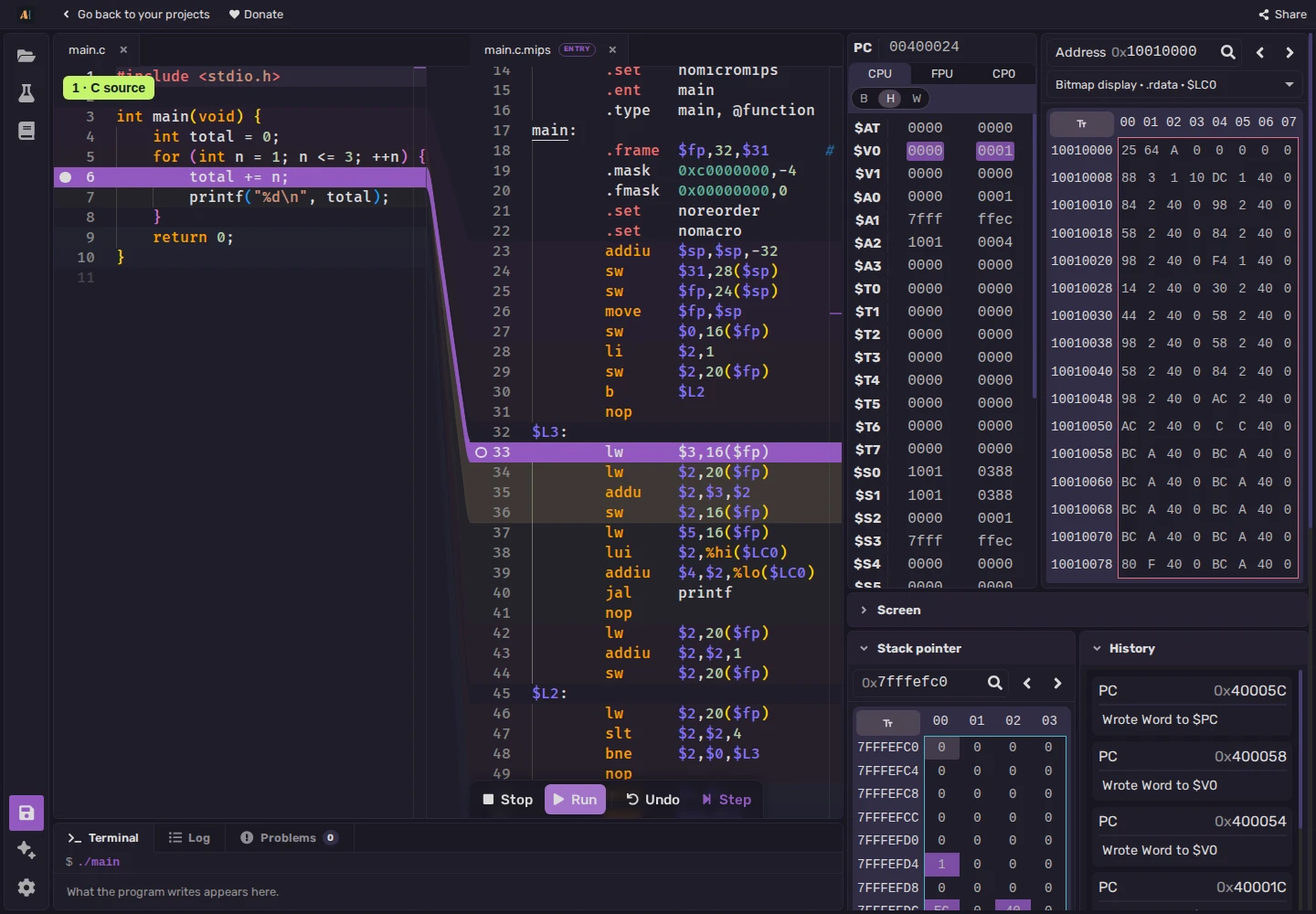
Choose Stop after the run finishes to close its session and return to editing. Click the narrow margin to the left of the source line numbers beside total += n;. When the breakpoint marker appears, Build and Run. At the pause, select the source line to highlight its mapped assembly block.
GCC 14.2 at -O0 produces these instructions for total += n;:
lw $3,16($fp)
lw $2,20($fp)
addu $2,$3,$2
sw $2,16($fp)A register is a small storage location in the processor. $fp, the frame pointer, holds the base address of the function's stack frame: memory for its local data. 16($fp) is 16 bytes beyond that base, where total is stored; 20($fp) holds n. Confirm these locations in your highlighted block, since another compiler or version may choose different registers and offsets.
On the first iteration, total is 0 and n is 1. Step through the first three instructions, then pause before sw to prepare Memory as described below. Check these resulting values; an instruction may leave a register at the number it already held, with no visible change.
| Instruction | Meaning | First-iteration observation |
|---|---|---|
lw $3,16($fp) | Load a four-byte word from memory | $3 receives total: 0 |
lw $2,20($fp) | Load the other word | $2 receives n: 1 |
addu $2,$3,$2 | Add the two register values | $2 receives 0 + 1 = 1 |
sw $2,16($fp) | Store a word in memory | total's stored value becomes 1 |
Registers labels $2 as $V0 and $3 as $V1; each pair names the same register. To inspect total, add 0x10 (decimal 16) to $fp. In the screenshot, 0x7fffefc0 + 0x10 = 0x7fffefd0. Use your run's actual $fp value; a calculator in hexadecimal mode can do the addition.
Enter that address at the top of Memory and press Enter. Drag across its four adjacent byte cells and read the selection popup's decimal value, 0. Step through sw, then inspect the four bytes again: total is now 1. Read without typing, since typing edits memory. The next four bytes hold n. The screenshot also shows these locations in the lower Stack pointer view; the upper 0x10010000 view shows a different area.
Choose Run to continue to the next iteration's breakpoint. Total is now 1, n is 2, and the addition produces 3. Run continues the same execution; it does not restart it. Undo reverses a recorded instruction for another inspection.
Change the source, then compile again
Choose Stop and change n <= 3 to n <= 4. Compile, Build, and Run again; the fourth total is 10. Click the breakpoint marker to remove it if you want the run to finish without pausing.
After a source or local-header edit, Compile again before Build. For example, changing a LIMIT definition in limits.h requires recompiling the source that uses it.
Editing generated assembly removes its reliable source mapping. Recompiling asks before replacing those edits. Recompile after reopening a saved project to restore source highlights and mapped breakpoints.
Compare optimization levels
-O0 avoids many optimizations, but source lines still need not match instructions one for one. Select -O2, then Compile, Build, and Run before comparing the output and assembly. The compiler may combine or move work and remove unused results. The printf output remains, while the calculation can change shape.
Targets and libraries
Supported targets are MIPS, RISC-V, RISC-V-64, and X86. MIPS and RISC-V offer GCC or Clang; x86 uses GCC. The supplied <stdio.h> runtime connects printf to Terminal.
For C++17, create main.cpp with this program, select it, then Compile, Build, and Run:
#include <cstdio>
int main() {
int total = 0;
for (int n = 1; n <= 3; ++n) {
total += n;
std::printf("%d\n", total);
}
return 0;
}
<iostream> and containers such as std::vector are unavailable. Exceptions and RTTI are disabled. Compile processes one selected source file; additional .c or .cpp files are not compiled and linked automatically.
Compile sends the selected source and local headers to Compiler Explorer. See MIPS C/C++, RISC-V C/C++, or x86 C/C++ for target-specific libraries and behavior.